Dynamic Parameters in JMeter: Read CSV Data and Build Request Parameters on the Fly
A step-by-step guide to reading CSV data with a varying number of items and splitting them into dynamic HTTP request parameters using BeanShell PreProcessor in JMeter.
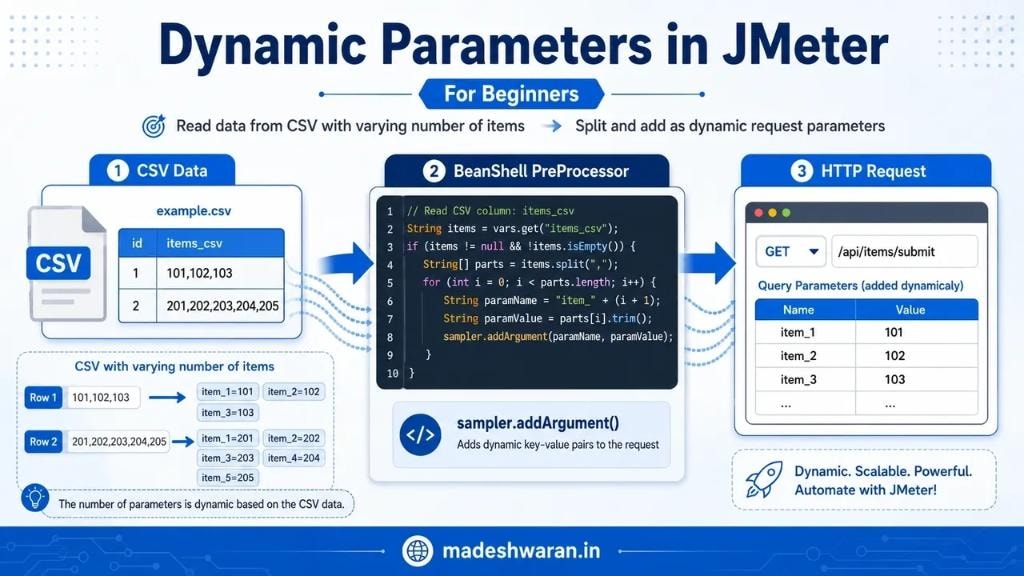
One of the most common challenges in JMeter load testing is handling request parameters that vary in count across test data rows. A fixed parameter list breaks the moment your CSV has rows with different numbers of items. Here is how to solve it cleanly using a BeanShell PreProcessor.
The Problem
Imagine you are testing an API endpoint that accepts a list of item IDs as query parameters — item_1, item_2, item_3, and so on. Your CSV test data looks like this:
| id | items_csv |
|---|---|
| 1 | 101,102,103 |
| 2 | 201,202,203,204,205 |
Row 1 has three items. Row 2 has five. A static parameter mapping simply cannot handle this — you need the parameters to be generated dynamically at runtime based on whatever is in the CSV column.
The Solution: Three Steps
The workflow has three stages: CSV Data → BeanShell PreProcessor → HTTP Request.
Step 1 — Set Up Your CSV Data Config
Add a CSV Data Set Config element to your Thread Group. Configure it to read your file and map the columns to JMeter variables. For the example above:
- Filename: path to your CSV file
- Variable Names:
id,items_csv - Delimiter:
,(or use a different delimiter if your item values contain commas — a semicolon works well)
At runtime, JMeter will populate ${items_csv} with the raw comma-separated string from each row.
Step 2 — BeanShell PreProcessor
Add a BeanShell PreProcessor as a child of your HTTP Request sampler. This script reads the items_csv variable, splits it, and adds each item as a named parameter:
// Read CSV column: items_csv
String items = vars.get("items_csv");

if (items != null && !items.isEmpty()) {
    String[] parts = items.split(",");

    for (int i = 0; i < parts.length; i++) {
        String paramName  = "item_" + (i + 1);
        String paramValue = parts[i].trim();
        sampler.addArgument(paramName, paramValue);
    }
}
What this does:
vars.get("items_csv")— retrieves the current row's value from the JMeter variableitems.split(",")— splits the string into an array regardless of how many items existsampler.addArgument(paramName, paramValue)— adds each item as a key-value pair directly to the HTTP request
For Row 1 (101,102,103) this produces item_1=101, item_2=102, item_3=103.
For Row 2 (201,202,203,204,205) this produces five parameters automatically — no manual configuration needed.
Step 3 — HTTP Request
Your HTTP Request sampler does not need any hardcoded parameters. The BeanShell PreProcessor runs before the sampler fires and injects the parameters at runtime. The request goes out to your endpoint with exactly the right number of query parameters for each data row.
Why sampler.addArgument() Instead of Variables?
You might wonder why not just set JMeter variables like ${item_1}, ${item_2} and reference them in the HTTP Request's Parameters tab. The problem is that the Parameters tab requires a fixed number of rows. If Row 1 adds three parameters and Row 2 adds five, the leftover ${item_4} and ${item_5} from the previous iteration will bleed into Row 1's request.
sampler.addArgument() adds directly to the sampler's argument list for that single execution. It is clean, isolated, and scales to any number of items without side effects.
Handling Edge Cases
Empty rows: The if (items != null && !items.isEmpty()) guard prevents a NullPointerException when a CSV row has no value in the items column.
Whitespace: parts[i].trim() strips any accidental spaces around item values — common when editing CSV files manually.
Different delimiters: If your item values themselves contain commas, switch to a semicolon delimiter in both the CSV Data Set Config and the split(";") call.
Very large item lists: BeanShell is interpreted and can be slow under high concurrency. For thread counts above a few hundred, consider migrating the same logic to a JSR223 PreProcessor with the Groovy engine — it compiles the script and is significantly faster.
Groovy Version (JSR223 PreProcessor)
def items = vars.get("items_csv")

if (items) {
    items.split(",").eachWithIndex { value, index ->
        sampler.addArgument("item_${index + 1}", value.trim())
    }
}
Drop this into a JSR223 PreProcessor with Language: groovy for production-grade performance tests.
Summary
Dynamic parameters in JMeter do not require complex plugins or workarounds. A three-step pattern — CSV Data Set Config, BeanShell (or Groovy) PreProcessor, and a clean HTTP Request sampler — handles any number of parameters per row automatically. The key insight is using sampler.addArgument() to inject parameters at execution time rather than relying on a fixed parameter grid.
Dynamic. Scalable. Powerful. That is JMeter done right.
Explore Topics
Written by
Madeshwaran Kotteswaran
Content creator and writer sharing insights and stories.